
My geiger doesn't seem connected
- Danielgeiger
-
 Topic Author
- Offline
- Junior Member
-

Less
More
- Posts: 31
- Thank you received: 0
2 years 7 months ago #6726
by Danielgeiger
Replied by Danielgeiger on topic My geiger doesn't seem connected
I'm going to connect it to the Arduino. According to the drawing you sent me, it connects to GND and PULSE, but I'm not sure which Arduino pin is referred to as PULSE.

Please Log in or Create an account to join the conversation.
- steadramon
-
- Offline
- Senior Member
-

Less
More
- Posts: 40
- Thank you received: 13
2 years 7 months ago - 2 years 7 months ago #6727
by steadramon
Replied by steadramon on topic My geiger doesn't seem connected
Assuming your WiFi connected and you're in the Web interface? The arduino board isn't needed - everything is done by the ESP8266 D1 Mini and the Counter.
Connect the Pulse (actually marked VIN on Cajoe counters) from the Geiger Counter to D7 on the ESP8266. Connect the GND from the Geiger Counter to GND on the ESP8266. You can connect the 5V if you're not powering the ESP8266 by USB.
Connect the Pulse (actually marked VIN on Cajoe counters) from the Geiger Counter to D7 on the ESP8266. Connect the GND from the Geiger Counter to GND on the ESP8266. You can connect the 5V if you're not powering the ESP8266 by USB.
Last edit: 2 years 7 months ago by steadramon.
Please Log in or Create an account to join the conversation.
- Danielgeiger
-
Topic Author
- Offline
- Junior Member
-
Less
More
- Posts: 31
- Thank you received: 0
2 years 7 months ago #6736
by Danielgeiger
Replied by Danielgeiger on topic My geiger doesn't seem connected
You say that the Arduino is not necessary, so how do I connect with Radmon?, the key and password are in the Arduino code.
Please Log in or Create an account to join the conversation.

2 years 7 months ago #6737
by Simomax
Replied by Simomax on topic My geiger doesn't seem connected
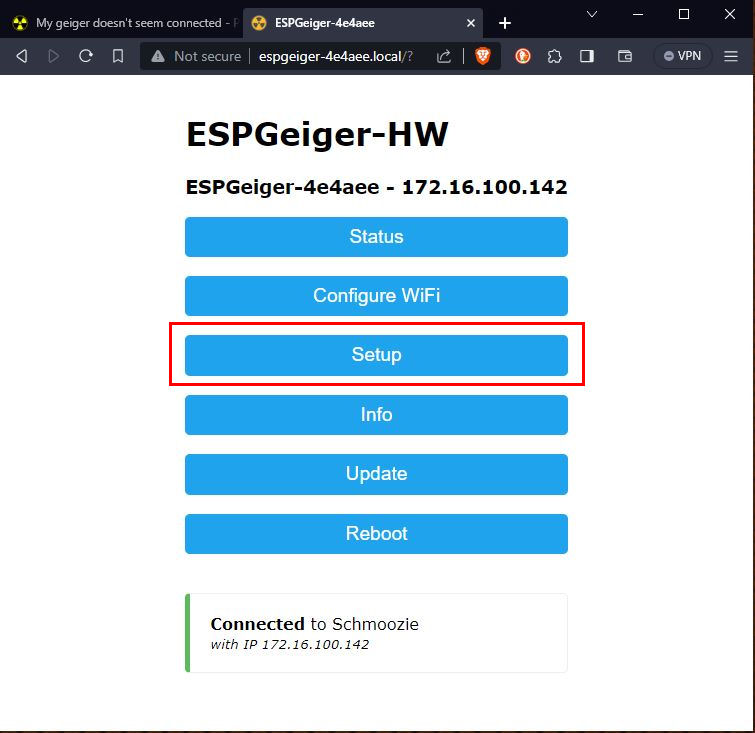
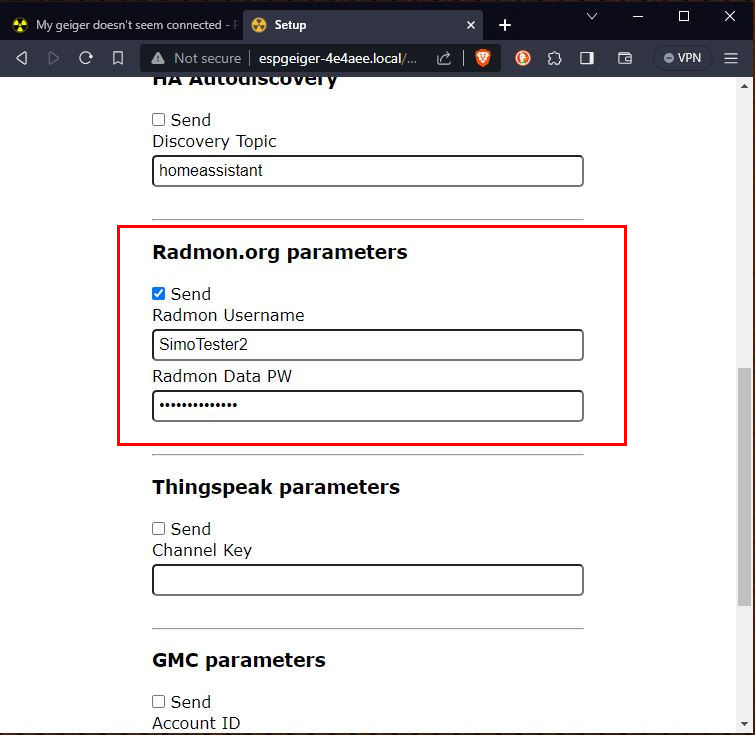
You don't need the Arduino IDE. The settings are done form the web interface. Browse to your ESPGeiger, click 'settings', scroll down and fill in the radmon.org part. Don't forget to put a tick in 'Send' box, and untick anything you are not using.
Attachments:
Please Log in or Create an account to join the conversation.
- Danielgeiger
-
Topic Author
- Offline
- Junior Member
-
Less
More
- Posts: 31
- Thank you received: 0
2 years 7 months ago #6738
by Danielgeiger
Replied by Danielgeiger on topic My geiger doesn't seem connected
this is my panell:

Please Log in or Create an account to join the conversation.
2 years 7 months ago #6739
by Simomax
Replied by Simomax on topic My geiger doesn't seem connected
Press the 'Configure WiFi' button and connect it to your WiFi at home. Then browse to it on your home WiFi and you will get the main menu.
Make a note of where it says 'ESPGeiger-XXXXXX' at the top. Then once it is connected to your home WiFi browse to http://espgeiger-XXXXXX.local, where XXXXXX are the numbers and letters at the top of your page.
Make a note of where it says 'ESPGeiger-XXXXXX' at the top. Then once it is connected to your home WiFi browse to http://espgeiger-XXXXXX.local, where XXXXXX are the numbers and letters at the top of your page.
Please Log in or Create an account to join the conversation.
Moderators: Gamma-Man
Time to create page: 0.547 seconds